











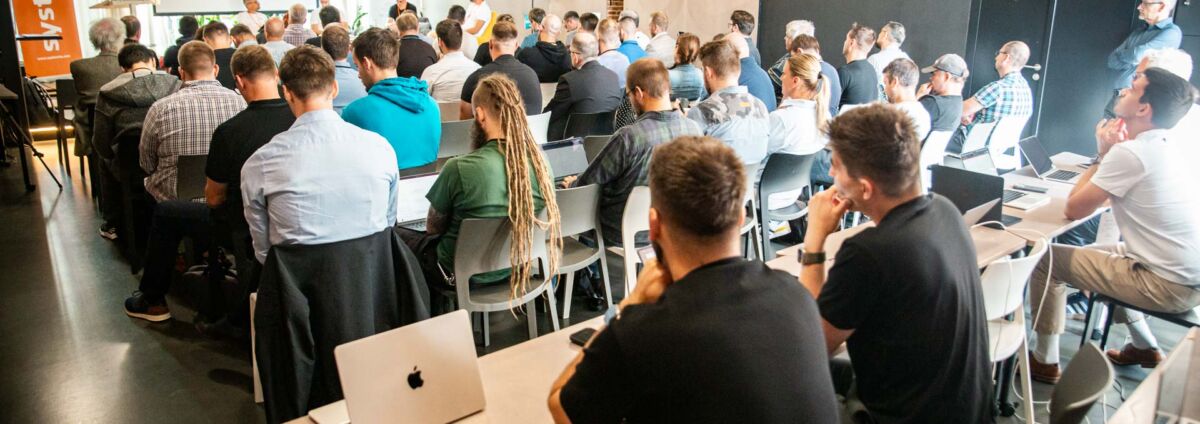
For the fifth Apple Admin Day, we’ve structured the event around three topics that are playing an increasingly important role in the management of corporate Macs today: automation, digital sovereignty, and governance.
Throughout the day, we covered everything from device management and telemetry to macOS compliance and real-world experience with deploying Macs for developers in a banking environment. And because the world of enterprise IT is changing rapidly, we also touched on AI governance and on-premises AI running directly on Apple Silicon.
We won’t be transcribing several hours of presentations and discussions here. We’ve selected topics that we believe best illustrate the current direction of Apple device management in businesses and that may be of interest even to those who weren’t able to attend Apple Admin Day this time.
Ondřej Kubeček, Sales Director at System4u, served as the host for the entire program
Who spoke at #5 Apple Admin Day
This time, two international guests accepted the invitation, and the program also included a case study from a real-world enterprise environment.
Spencer Pitts, Partner and CTO at Omnissa, discussed how traditional endpoint management is changing and why it is no longer enough to simply manage devices using individual commands. He spoke about the Autonomous Workspace, telemetry, automation, and how to keep devices in the desired state over the long term.
Henry Stamerjohann, a Solution Consultant at Fleet Device Management and an active member of the Mac Admin open-source community, presented on the macOS Security Compliance Project (mSCP). He demonstrated how to work with security baselines, CIS benchmarks, and compliance in a way that ensures they don’t just become yet another audit checklist.
Tomáš Jesenský of ČSOB Slovakia shared his experience with implementing Macs in the bank’s environment. Macs are used there primarily by developers, and their specific requirements clearly illustrated where the security needs of a large organization can clash with people’s need to work quickly and without unnecessary obstacles.
The closing workshop was organized by Ladislav Blažek, CTO of System4u, and Martin Tvrdý, head of the UEM team at System4u. The topics covered included Apple Intelligence, AI governance, and local AI. It wasn’t just about the slides—there was also a cluster of two Mac Studio computers and several MacBooks available for attendees to try out local models.
Spencer Pitts: A device should know what state it’s supposed to be in
Spencer’s lecture began with a fairly well-known problem.
Traditional device management is largely command-based. The administrator sets the configuration, sends it to the device, and then checks to see if it was actually applied. If the status changes later, a further response is required.
With just a few devices, this isn’t a major problem. But with thousands of endpoints, it certainly is.
Omnissa therefore bases its vision of the Autonomous Workspace on a slightly different principle. IT defines what the device should look like, and the platform works to keep it in that state. If something changes, telemetry detects the change, and automation can restore the device to its intended state.
Spencer used the term ” desired state management” to describe this approach.
Apple is moving in a similar direction with Declarative Device Management (DDM). The device receives information about the desired state, and some of the work that previously had to be constantly managed by the MDM server is shifted directly to the device.
For Apple device administrators, this is a fairly significant change. Not because traditional MDM commands will disappear overnight, but because the very way of thinking about management is changing.
I don’t focus on every single action. I focus on the result I want to achieve.
Telemetry isn’t just for the help desk
For something like this to work, the IT department needs to know what’s actually happening on the device.
Spencer therefore devoted a lot of time to telemetry and the Digital Employee Experience. He focused not only on whether a device was enrolled in UEM or running the correct version of macOS, but also on how users actually work on it.
These may include battery issues, problems with a specific app, performance issues, or recurring technical problems.
This is interesting, for example, when upgrading hardware.
Companies often follow a simple rule: if a laptop is a certain number of years old, it gets replaced. But an older Mac may still handle its tasks without any problems, while a newer device might slow the user down every day due to a specific issue.
If the IT department has high-quality data, it doesn’t have to base its decisions solely on the purchase date.
And that same telemetry can be used for security purposes. If the device’s status changes and it no longer meets a condition, the event can automatically trigger a follow-up action.
Here, traditional UEM is gradually being integrated with security and Zero Trust principles.
Henry Stamerjohann: Compliance shouldn’t be spread across four different files
The morning session continued with the macOS Security Compliance Project.
If you manage Macs in a larger organization, you’re probably familiar with the following situation: The security policy says one thing, the MDM contains a specific configuration, the audit documentation describes the same thing all over again, and on top of that, there are several scripts used to check the status.
As long as everything is up to date, it works.
But then someone changes a single value in MDM. The document remains the old version. So does the script. After a few similar changes, it’s no longer entirely clear which version is actually valid.
One of the major advantages of mSCP is the ability to keep rules in one place and then use them to create other artifacts—such as configuration profiles, declarative configurations, compliance scripts, or audit documentation.
Henry demonstrated this using a standard screen lock setting.
If a company decides to use a different value instead of the original one, the change may be reflected in the profile that enforces the setting, in the script that checks it, and in the documentation for the auditor.
There’s no need to manually rewrite the same thing three times.
Furthermore, if the rules are versioned in Git, a record of the changes remains in the history. In a few months, you can look back to see why a specific value was chosen, who made the change, and who approved it.
Should my company simply adopt the CIS benchmark and implement it as is?
He doesn’t.
And that was one of the things Henry emphasized most during his lecture.
A security baseline and a benchmark are not the same thing. A baseline specifies what should be controlled. A benchmark typically includes specific values that someone has selected based on a particular risk profile.
However, every organization has a different risk profile.
For example, the CIS benchmark may recommend a specific time after which the screen should lock. However, that does not mean that the same value will automatically be appropriate for every type of user and every environment.
A company must assess its own risks and adjust its policies accordingly.
This isn’t about looking for an excuse not to follow security recommendations. It’s about understanding why our settings are the way they are.
And be able to provide evidence to support your decision later.
mSCP does not manage devices on its own
There was one other important distinction in the debate over compliance.
The macOS Security Compliance Project is not a replacement for an MDM or UEM platform.
mSCP prepares the rules and related artifacts. However, these still need to be deployed to the devices, their status checked, and any necessary corrective actions taken.
Tools such as Jamf, Workspace ONE, Fleet, and other Apple device management systems are also used for this purpose.
Similarly, compliance does not replace EDR or vulnerability management. Each of these tools addresses a different issue. They become meaningful when they work together.
DDM and sovereignty: two topics that came up repeatedly in the discussion
The morning lectures were followed by a panel discussion featuring Spencer Pitts, Henry Stamerjohann, and Ladislav Blažek.
Declarative Device Management came up repeatedly during the session.
Apple is gradually moving more aspects of management to DDM. For administrators, this does not mean they should immediately discard all traditional configuration profiles. In an enterprise environment, both approaches will continue to coexist for some time.
However, it makes sense to start working with DDM today rather than relying on a solution to be developed sometime in the future.
The second major topic was digital sovereignty.
It became clear from the discussion that sovereignty is not simply a choice between the cloud and an on-premises server. It can mean something different for every organization.
One needs to be sure that its data will not leave a certain country. Another is concerned with where the service itself is hosted. Yet another wants to have control over the encryption keys or the option to switch to another provider.
So first, it is necessary to determine exactly what the company wants to control. Only then can a reasonable decision be made about the technology.
Tomáš Jesenský: How to Get Macy to the Developers at the Bank
After lunch, it was time for the story of ČSOB Slovakia.
And what made it particularly interesting was that it wasn’t an ideal laboratory setting. Tomáš Jesenský openly described the challenges involved in introducing Macs and why the project came about in the first place.
Developers occupy a somewhat unique position in the enterprise environment.
They need tools that the average user doesn’t need. They want new versions of those tools quickly and often work with technologies that aren’t included in the standard corporate catalog.
The traditional packaging process, on the other hand, can take weeks.
For someone who needs a new tool today, that’s simply too long to wait.
One of the earlier solutions, therefore, was to grant developers administrator privileges. While this solves the installation problem, it creates another problem—this time a security issue.
In addition, ČSOB originally operated primarily in a Windows environment, and the development workstation was separated from the company’s production services for security reasons.
In practice, this meant an additional device, a virtual desktop, or switching between environments.
Macy’s was supposed to help change this model.
No admin privileges, but also no waiting for every app
When designing the new environment, several platforms were considered, including Microsoft Intune, Workspace ONE, and Jamfu.
However, the selection process wasn’t just a comparison of the features of individual products.
It was also necessary to address identities, groups in Microsoft Entra ID, access to corporate services, application installation, security monitoring, and how the entire environment would fit into the bank’s existing architecture.
The resulting solution was built around Jamfu and other related tools.
Users can obtain approved applications through standard channels; Homebrew is also used. If a developer needs to perform an operation requiring elevated privileges, they do not need to have a permanent local admin account to do so.
Permissions can be increased for a limited time, and the action remains traceable.
That’s a significant difference.
If a user has permanent administrator privileges, an attacker will also have access to them in the event of a compromise. With temporary and controlled privilege escalation, there is less room for abuse.
At the same time, however, developers do not need to contact support for every non-standard operation.
When user time is factored into security
During his presentation, Tomáš also shared a specific example of performance in development.
In one of their scenarios, the build took tens of minutes in the original environment. On a Mac, the same process took about three minutes.
This isn’t a blanket comparison between Windows and macOS, nor was it presented as such.
However, it’s interesting to look at the total costs.
When purchasing work equipment, the cost of hardware and licenses is usually factored in. It’s harder, however, to account for the time people spend waiting several times a day for the computer to finish its work.
For developers, this very difference can play a fairly significant role.
So ČSOB didn’t just use the Mac as another type of laptop. It involved a complete overhaul of the work model—from application installation to permissions to access to corporate services.
AI governance: First, find out what people are using
The last part of the day was devoted to AI.
Martin Tvrdý and Ladislav Blažek began by discussing Apple Intelligence and the possibilities that Declarative Device Management offers administrators. From a business perspective, the ability to control certain AI features in considerable detail—rather than relying on a simple “allow everything” or “disable everything” approach—is particularly interesting.
But the discussion quickly went even further.
ChatGPT in a browser is just a small part of the overall problem today. Employees can use desktop applications, AI assistants built right into development tools, various coding agents, or local models.
And the company may not even know that they’re using them.
So is it safest to simply ban AI in the company?
In most cases, no.
The IT department has already experienced a similar situation with the rise of cloud services. When employees didn’t get the tools they needed, they started using their own Dropbox accounts, their own cloud storage, and other services outside the company’s control.
Shadow IT emerged.
The situation can be very similar with AI.
If a company simply blocks access to a particular tool, that doesn’t mean people will stop using AI. They can simply find another way.
AI governance, therefore, begins with transparency.
What tools do people use? On which devices? Where does the data go from there? And is there a secure alternative that the company can offer them?
During the workshop, we looked at how Fleet, Omnissa, and Jamf approach gaining this kind of overview.
Only when IT knows what’s going on in the environment can it begin to set rules sensibly.
What Can Local AI on a Mac Do?
The last part was much more practical.
We had MacBooks with local models set up on site, as well as two Mac Studios, each with 128 GB of unified memory. The machines were connected via Thunderbolt 5, and using Exo Labs technology, it was possible to pool their resources.
The reason is simple: a larger AI model requires more memory than a single machine can provide.
It was now possible to run a model on the cluster that wouldn’t have fit on a single Mac Studio.
This wasn’t an attempt to prove that a few Macs could replace a data center with GPU servers. What was interesting was something else—just how far the capabilities of local computing have advanced in a relatively short period of time.
The smaller model can now run directly on a MacBook. The larger one runs on a Mac Studio. And if one machine isn’t enough, some workloads can be distributed across multiple devices.
This opens up an interesting opportunity for the company, especially in cases where it does not want to send certain data to a public AI service.
The cloud will continue to be a viable option for a variety of scenarios. Local AI, however, adds another option that wasn’t widely anticipated in typical enterprise environments just a few years ago.
From MDM to AI: Mac Management Is Expanding
When we first started organizing Apple Admin Day, a large part of the discussion naturally centered on MDM—how to enroll, configure, and secure devices, and how to install apps on them.
All of this, of course, remains.
It’s just that a lot of other layers have built up around it.
Today, an administrator needs to know whether a device meets the required state, what the user’s experience is like, whether the security configuration actually aligns with company policy, and what happens if the device deviates from that state.
On top of that, AI is coming—and with it, new types of applications, data flows, and permissions.
The fifth Apple Admin Day, therefore, wasn’t just about new macOS features or specific MDM platforms. Much more attention was paid to how to structure the entire environment so that it could be managed over the long term.
Automation is intended to eliminate unnecessary manual work. Compliance must be traceable and justifiable. Users should be given the tools they need without IT losing control in the process.
Whether it’s a work Mac, a security baseline, or an AI tool, we always come back to the same thing: we need to know what’s happening in the environment and be able to respond appropriately to changes.
Do you need to manage Apple devices at your company?
At System4u, we help companies design, deploy, and further develop environments for Apple devices. We don’t just handle Apple MDM itself, but also ensure integration with corporate identities, applications, security policies, and existing infrastructure.
Every environment is a little different. Macs for regular office users are managed differently than developers’ devices, and the platform is managed differently in a company with strict regulatory requirements.
That is why we select technology based on what the company and its users actually need.


